Free disk space analyzer · Mac, Windows and Linux

Space Scout

What's eating your disk? Find out in seconds.

Space Scout scans a folder or a whole disk, ranks everything by size, and maps where the space went — a sortable folder tree, a treemap, a breakdown by file type and the largest files anywhere in the scan. Clean up with one click; everything goes to the Trash, never straight to deletion. Free, with no account and nothing sent anywhere.

Free · macOS 12 or later · Windows 10 and 11 · Ubuntu 24.04+ and Arch Linux · Version 2.0

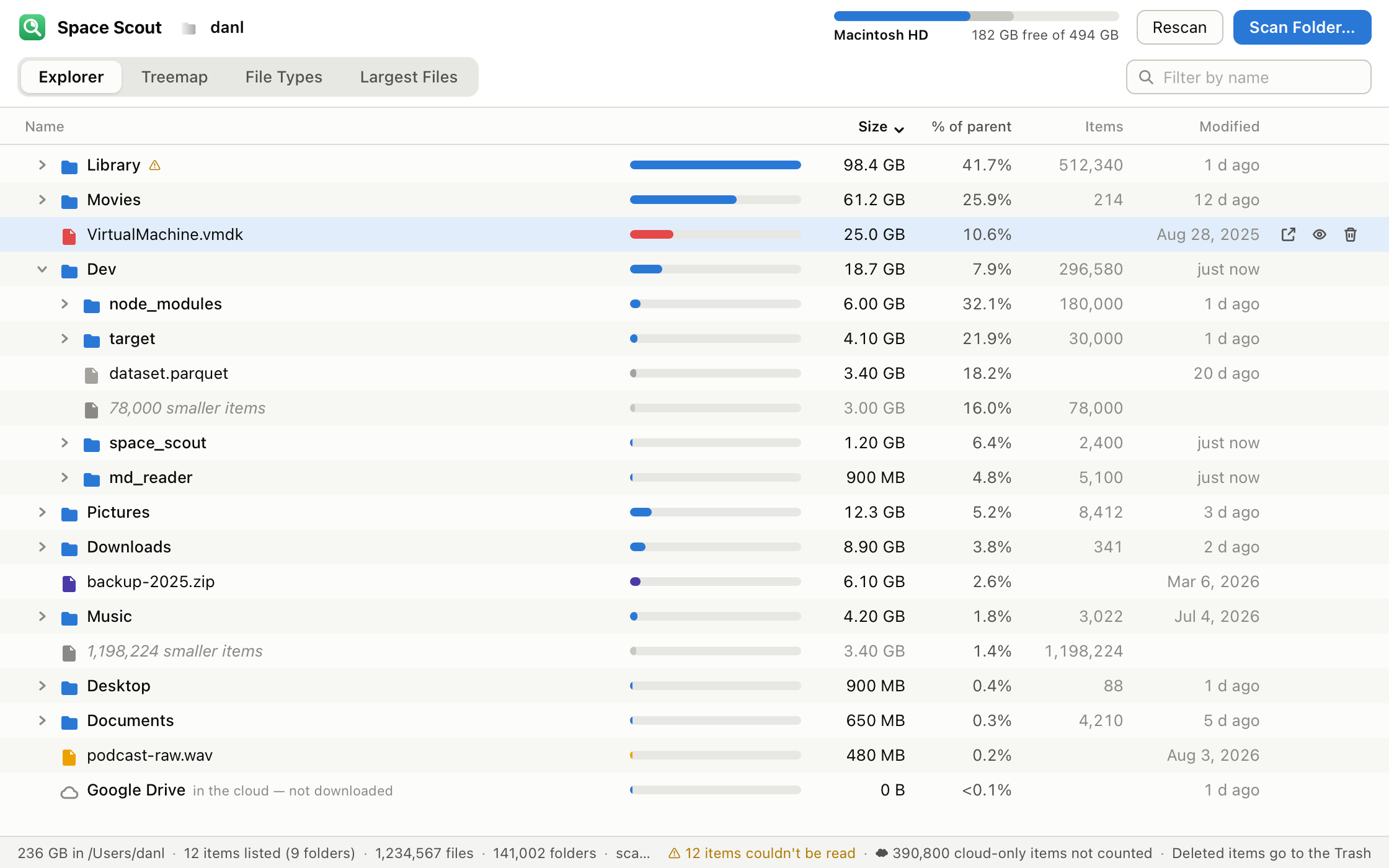
Space Scout's Explorer view of a home folder on a Mac. Rows for Library, Movies, Dev, Pictures and other folders are sorted by size with blue size bars, a percentage of the parent, item counts and dates. The Dev folder is expanded to show node_modules, target and a dataset file inside it, and a selected file row shows Reveal, Open and Trash buttons. A meter at the top right shows 182 GB free of 494 GB on Macintosh HD.
Every folder and large file, ranked by size

Fast enough to use every day

A scan reads a folder with several worker threads at once and never checks files one by one, so a drive with a million files is measured in seconds on an SSD. Rescan with ⌘R / F5 after cleaning up and watch the numbers drop.

See everything, ranked

The Explorer lists every folder and every file over 1 MB, largest first, with a size bar, its share of the parent, how many items are inside and when it last changed. Expand folders in place, sort by any column, filter by name, and move around with the keyboard — arrows, Return to open, Delete (Backspace on Windows and Linux) to go up.

A map of your disk

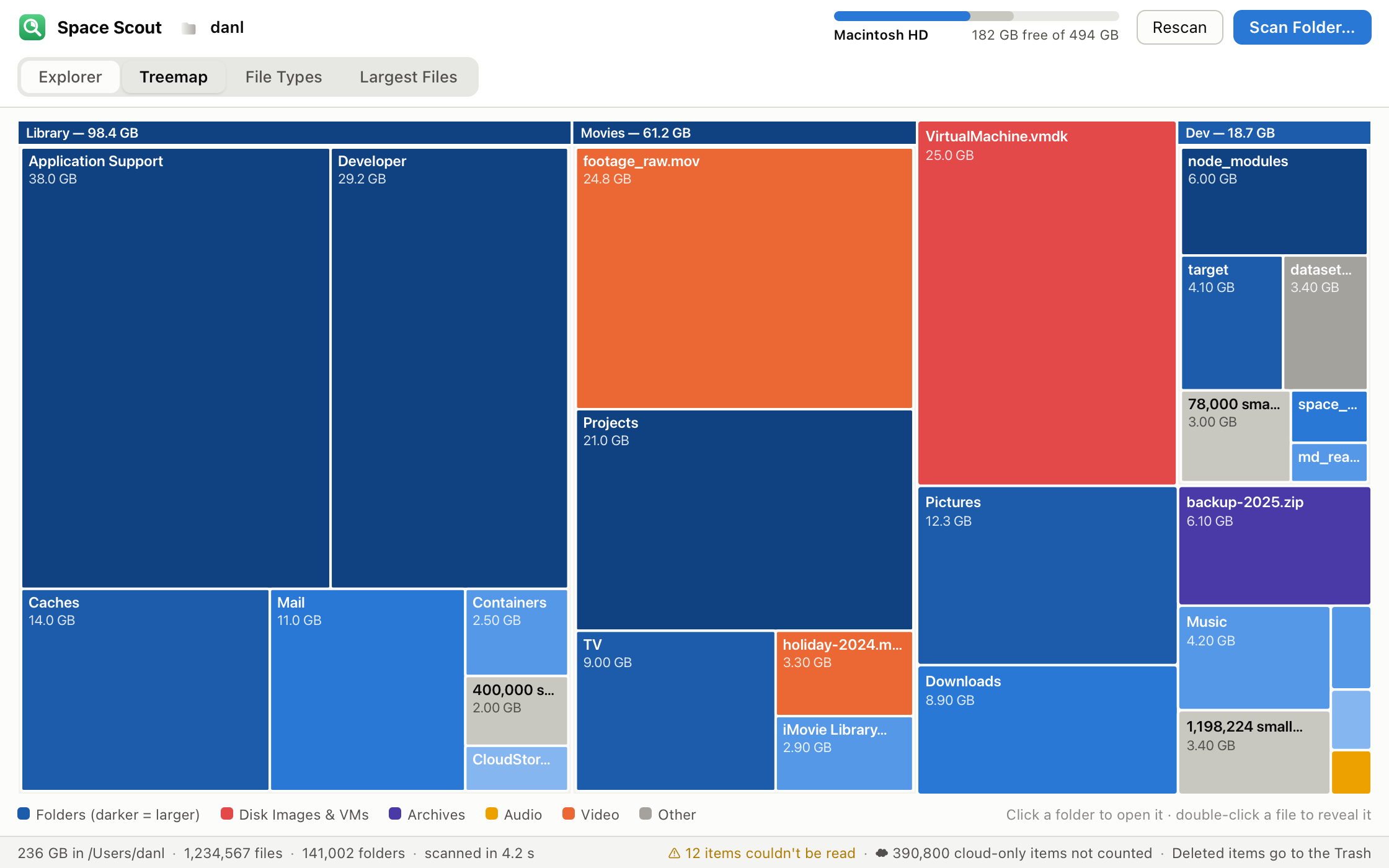
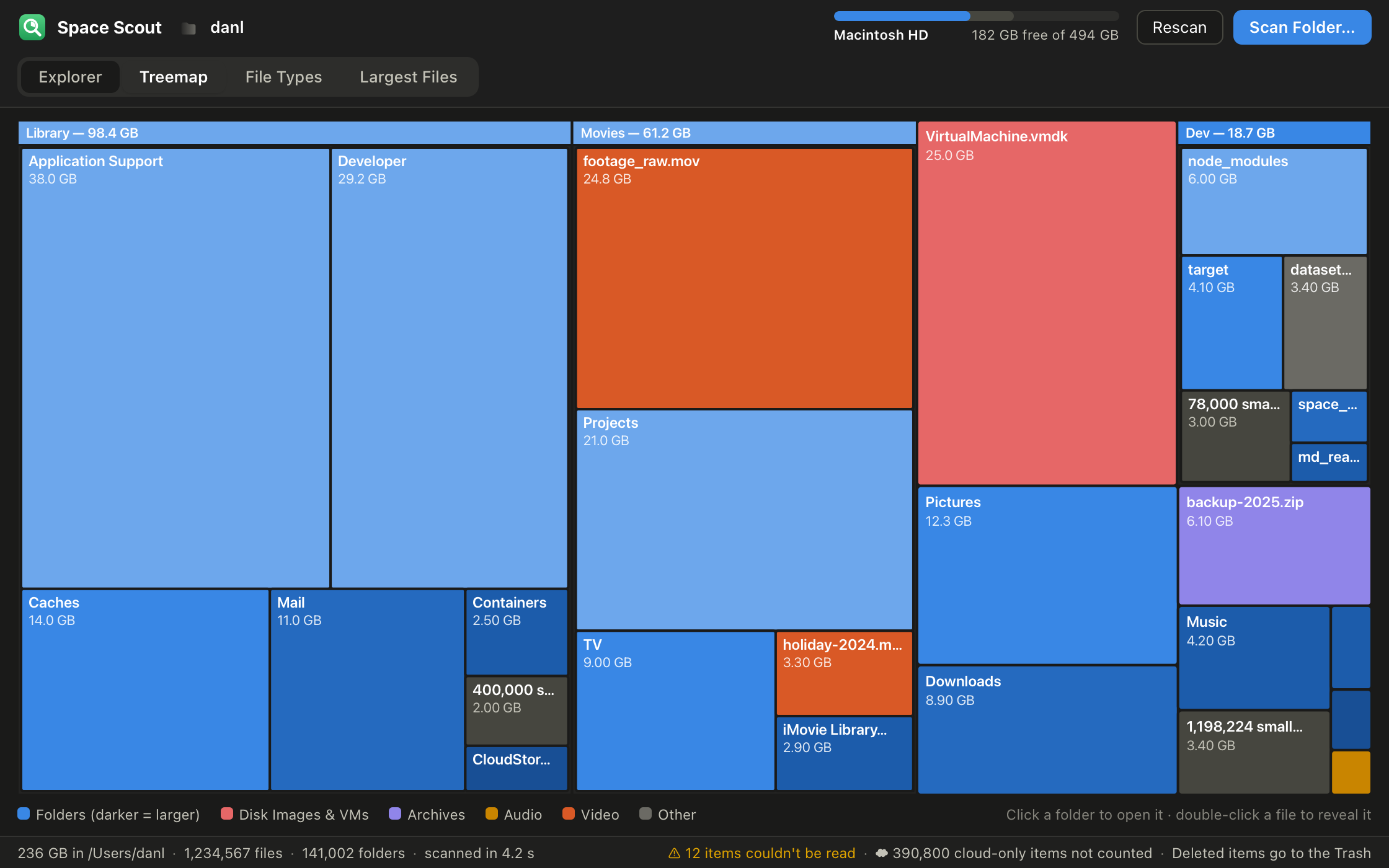
The Treemap draws the current folder as rectangles sized by the space they take — two levels deep, folders in blue (darker is bigger), files colored by type. Hover for the details, click a folder to open it, double-click a file to reveal it.

Space Scout's Treemap view of a home folder. Large blue rectangles labelled Library, Movies and Dev contain smaller nested rectangles such as Application Support, Developer and node_modules; an orange rectangle marks a large video file, a red one a virtual-machine disk image, and a violet one a zip archive. A legend along the bottom explains the colors.
The treemap: bigger box, bigger problem

Know what kind of files

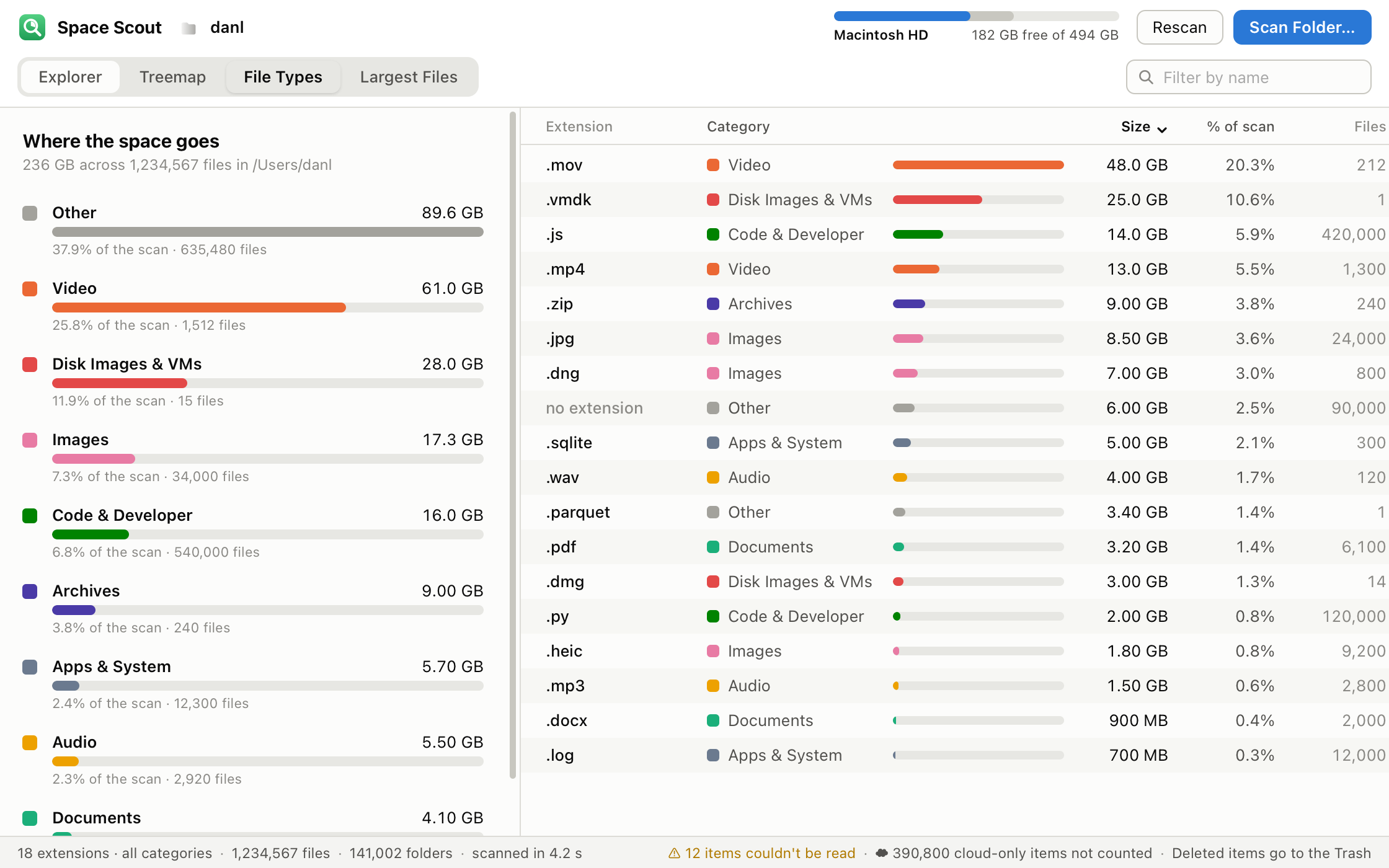
The File Types tab adds it all up: how much space goes to video, images, audio, documents, archives, disk images and virtual machines, code and developer files, apps and system files — and a sortable table of every extension in the scan. Click a category to list just its extensions.

Space Scout's File Types view. On the left, horizontal bars for Other, Video, Disk Images & VMs, Images, Code & Developer, Archives, Apps & System, Audio and Documents, each with its total size, share of the scan and file count. On the right, a table of extensions such as .mov, .vmdk, .js and .mp4 with category swatches, size bars and file counts.
Where the space goes, by kind of file

The biggest files, wherever they hide

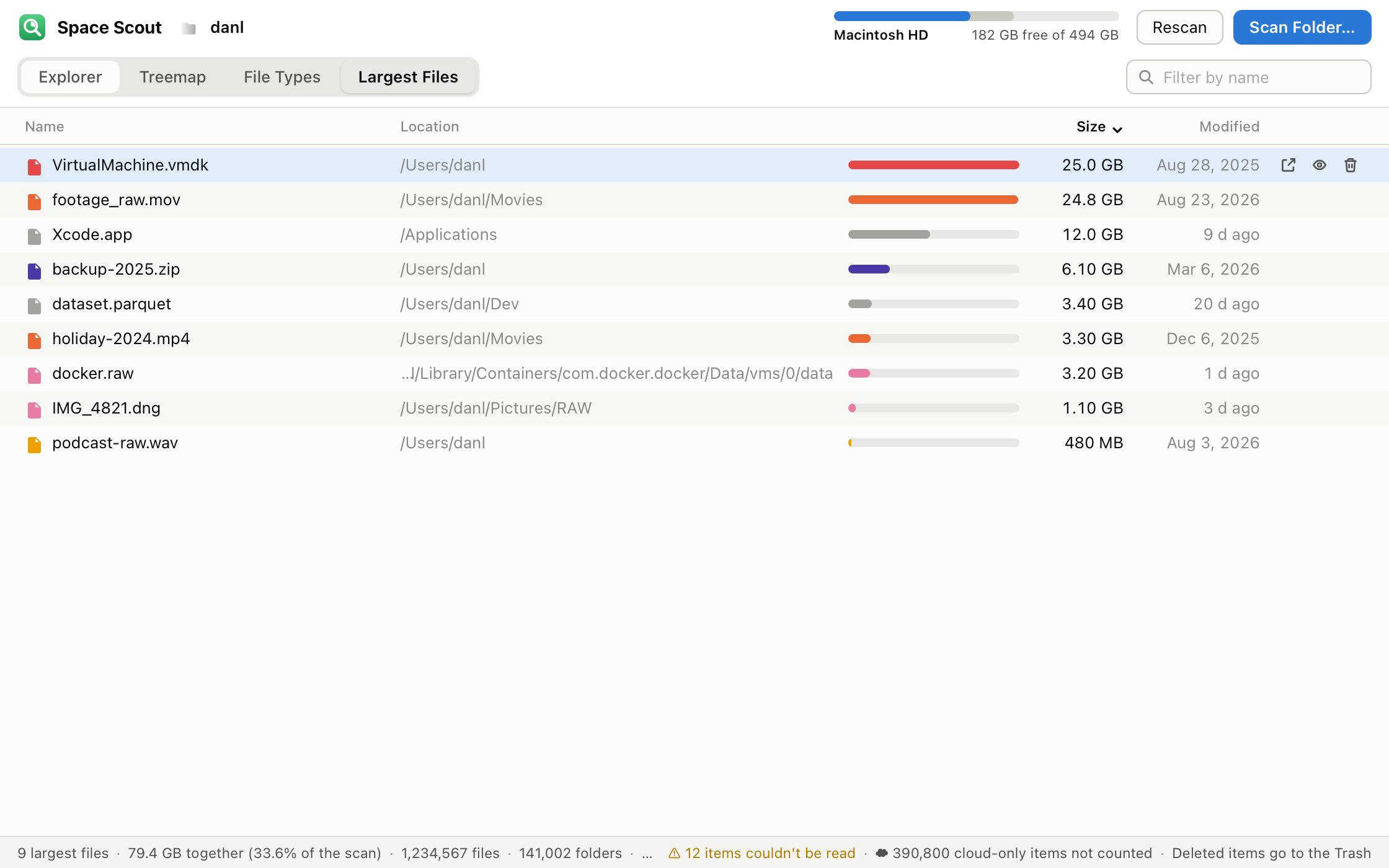
The Largest Files tab lists the thousand largest files found anywhere in the scan, with their location and date, so the forgotten disk image or the raw footage from last year is one click from the Trash.

Space Scout's Largest Files view listing files such as a virtual-machine disk, raw video footage, a backup zip and a Docker image with their folder paths, size bars, sizes and modification dates. The first row is selected and shows Reveal, Open and Trash buttons.
The thousand largest files in one list

Light or dark

Follows your system appearance, on all three platforms.

The same treemap view in dark mode: light-blue folder rectangles on a near-black background, with orange, red and violet file rectangles and the legend along the bottom.
Dark mode on the Mac

Clean up safely

Hover over any row for three buttons: reveal it in the Finder (File Explorer on Windows, your file manager on Linux), open it, or move it to the Trash. Deleting always asks first and always goes to the Trash or Recycle Bin, so nothing is gone until you empty it. Sizes update as you go.

Cloud folders without the download

Online-only files in iCloud Drive, Google Drive, OneDrive or Dropbox take no space on your disk. Space Scout reports them as "in the cloud" and leaves them there — a scan never triggers a download, and the totals show what's really on the drive.

Private by design

No account, no sign-in, no tracking, no update check. Space Scout never connects to the internet. The only things it writes are the files you move to the Trash.

Three steps

Pick a folder or disk.

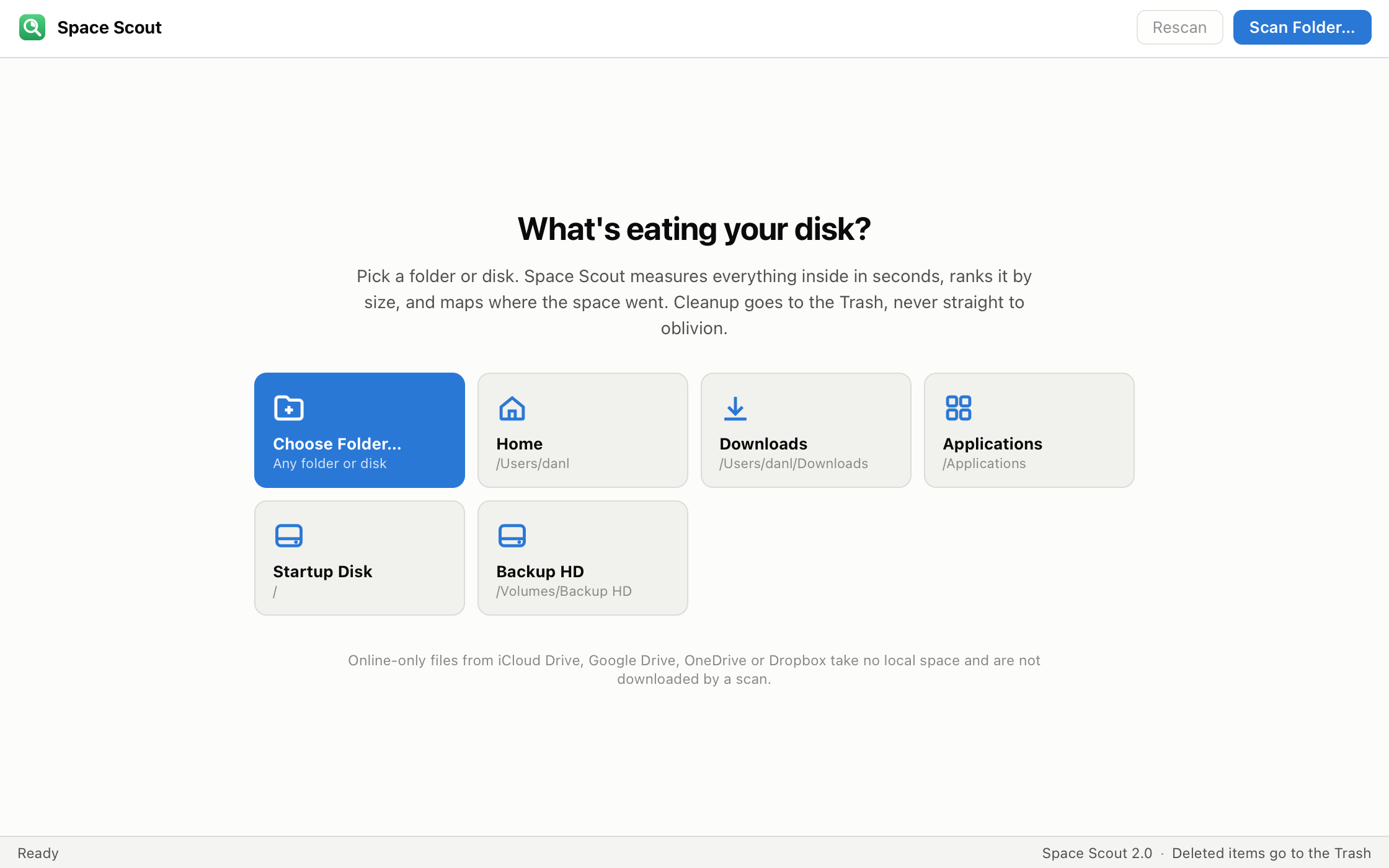
Click Scan Folder… or a quick pick — Home, Downloads, Documents, Applications, the startup disk or an external drive.

Space Scout's start screen with the headline "What's eating your disk?" and a row of cards: Choose Folder…, Home, Downloads, Applications, Startup Disk and Backup HD.
Start with a quick pick or any folder

Watch it count.

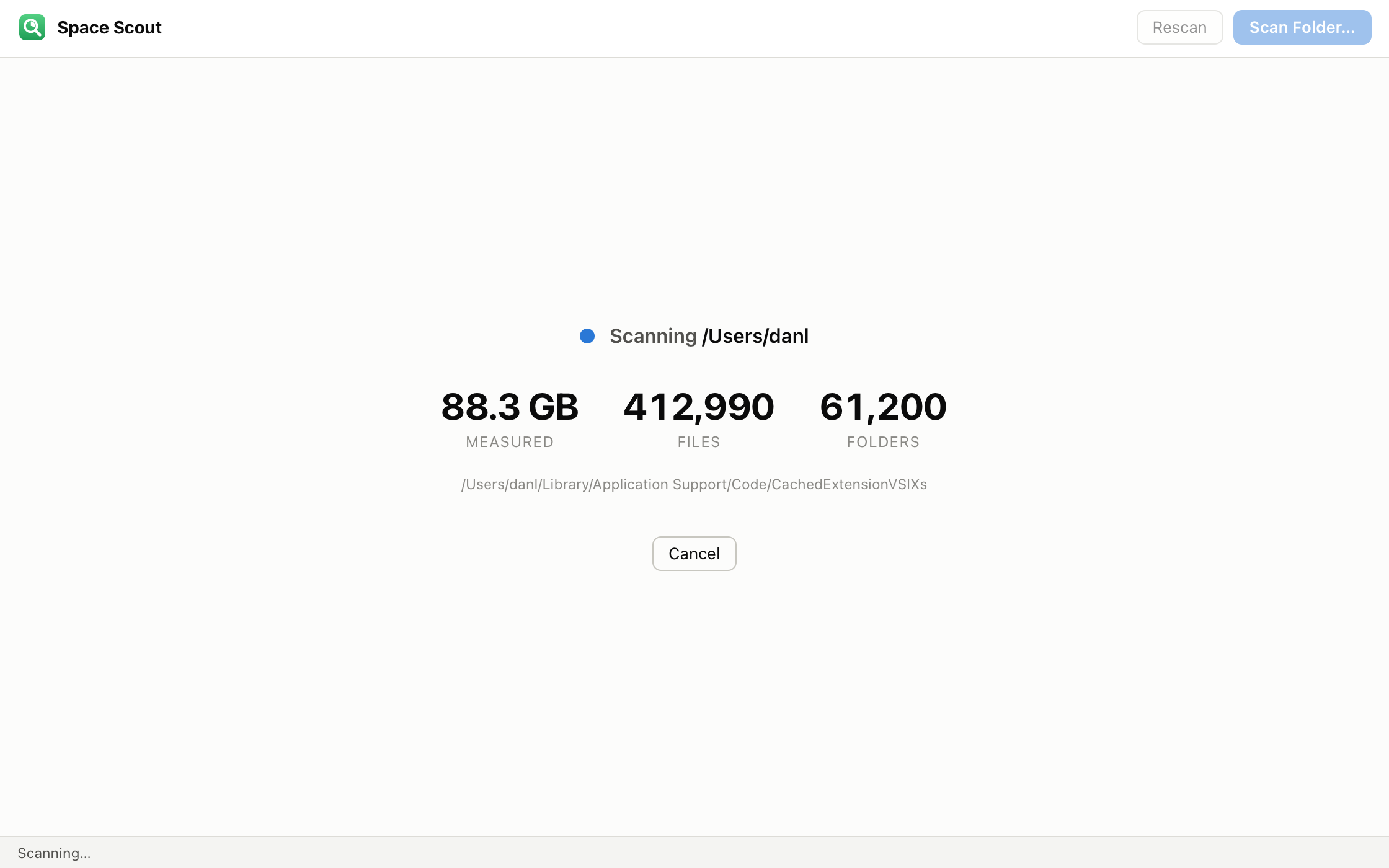
Live totals of bytes, files and folders while the scan runs; cancel any time.

Space Scout's scanning screen showing 88.3 GB measured, 412,990 files and 61,200 folders so far, the path currently being read and a Cancel button.
A scan in progress

Find it, fix it.

Browse the Explorer, Treemap, File Types and Largest Files tabs; reveal, open or trash anything with one click.

Download Space Scout 2.0

Free for Mac, Windows and Linux. No account, no installer tricks, nothing to configure.

Mac

Download for Mac (.dmg) 899 KB

Requirements

macOS 12 Monterey or later, Apple silicon or Intel.

Install

Open the .dmg and drag Space Scout into Applications.

For a complete picture of the whole disk, allow Full Disk Access in System Settings ▸ Privacy & Security; otherwise macOS asks folder by folder.

Windows

Download for Windows (.zip) 66.6 MB

Requirements

Windows 10 or 11, 64-bit, with the Microsoft Edge WebView2 Runtime (included with Windows 11 and nearly all up-to-date Windows 10 PCs).

Install

Unzip, then move SpaceScout.exe wherever you like — Documents, the Desktop, any folder — and double-click it. There's no installer.

Linux

Ubuntu .deb (x86_64) 30.8 MB Ubuntu .deb (arm64) 29.3 MB Arch package (x86_64) 31.1 MB

Requirements

Ubuntu 24.04 or later (x86_64 or arm64), or Arch Linux / Omarchy (x86_64). Uses GTK 4, libadwaita and WebKitGTK 6, which your package manager installs.

Install on Ubuntu

In the folder where you saved the download:

sudo apt install ./space-scout_2.0-1_amd64.deb     # arm64: ./space-scout_2.0-1_arm64.deb

Install on Arch / Omarchy

sudo pacman -U space-scout-bin-2.0-1-x86_64.pkg.tar.zst

What's new in 2.0 · License
Linux x86_64 tarball (used by the AUR package)

Made for

The "disk full" morning

Your Mac or PC says it's out of space and you have a meeting in ten minutes. Scan the home folder, open the Largest Files tab, trash the forgotten installer.

Developers

node_modules, build caches, container images, old virtual machines: Space Scout's File Types tab and treemap show how much of the disk is build output you can regenerate.

Photo and video libraries

Raw footage and exports add up fast. See which projects take the space, and which drive they're on, before buying another one.

IT and support teams

Scan a user's profile or a file server share and hand them a clear picture: what's big, what's old, what's safe to move. Runs from a zip on Windows with nothing to install.

Cloud-synced computers

iCloud Drive, Google Drive, OneDrive and Dropbox keep placeholders for files that aren't downloaded. Space Scout counts only what's really on the disk and never downloads anything to find out.

Why it's different

What's new in 2.0

Space Scout 2.0

  • Many times faster. A new parallel scan engine with bulk directory reads: a folder of 800,000 files that took 16 seconds in 1.0 now takes about 3 on an Apple-silicon Mac.
  • Cloud folders no longer stall the scan. Google Drive, iCloud Drive, OneDrive and Dropbox placeholders are recognised, reported as "in the cloud" and never downloaded. (1.0 could hang inside a Google Drive folder.)
  • A new interface. Explorer with expand-in-place folders, sortable columns, a name filter and keyboard navigation; a two-level Treemap; a File Types breakdown; Largest Files across the whole scan; a disk meter in the header; light and dark.
  • Now on Linux. Ubuntu 24.04+ (x86_64 and arm64) and Arch Linux / Omarchy (x86_64).
  • Universal Mac app. One build for Apple silicon and Intel.
  • Also: modification dates in every list; Open as well as Reveal; external and other volumes shown but measured separately; ⌘R / F5 to rescan; ⌘F / Ctrl+F to filter.

FAQ

Is Space Scout really free?
Yes, for personal and commercial use. There's no paid version, no trial and nothing to unlock.
Does it delete files?
Never directly. The Trash button moves the item to the Trash (Recycle Bin on Windows) after asking you, and the space is freed when you empty it. Until then you can put anything back.
Why doesn't the total match what my disk says is used?
Space Scout measures the folder you scanned, with the logical size of each file, and leaves out what it can't read and what's only in the cloud. The operating system's figure also includes other volumes, snapshots, purgeable caches and files outside your scan. Scan the startup disk with Full Disk Access (Mac) for the closest picture.
Some items say they "couldn't be read". What does that mean?
Permissions. On the Mac, allow Space Scout in System Settings ▸ Privacy & Security ▸ Full Disk Access, or allow the folders it asks for. On Windows and Linux, run it as the user who owns the files.
What does "in the cloud — not downloaded" mean?
That folder or file lives in iCloud Drive, Google Drive, OneDrive or Dropbox and isn't stored on this disk. Space Scout doesn't count it and doesn't download it. Download it in your cloud app if you want it measured.
Does it scan external drives and network shares?
Yes — pick the drive from the quick picks or with Scan Folder…. Other mounted volumes inside a scan are shown but not followed, so each drive is measured on its own.
The window is blank on Ubuntu 24.04.
Ubuntu's AppArmor rules can stop WebKitGTK's sandbox from starting. See Troubleshooting in the Linux README, installed with the app in /usr/share/doc/space-scout, and let us know through the contact page.
Does Space Scout send anything to Sorted Solution?
No. It has no update check, no analytics and no account. It never opens a network connection.

License

Space Scout is free for personal and commercial use. Full terms are in LICENSE.txt, included with every download. Please don't sell or redistribute the app — point people to this page instead.

Space Scout is built by Sorted Solution — an IT consulting and managed services firm for small and mid-size businesses. If your business needs reliable infrastructure, cloud support, or security guidance, we'd love to talk.

Learn what we do →

Get Space Scout

Free for Mac, Windows and Linux. No account, nothing sent anywhere.