Cella

PDF markup and takeoff for construction drawings

Redline drawing sets, measure to scale and get quantity takeoffs with automatic totals. Everything is saved right in the PDF.

Mac, Windows and Linux · Free 14-day trial · $149 once, no subscription

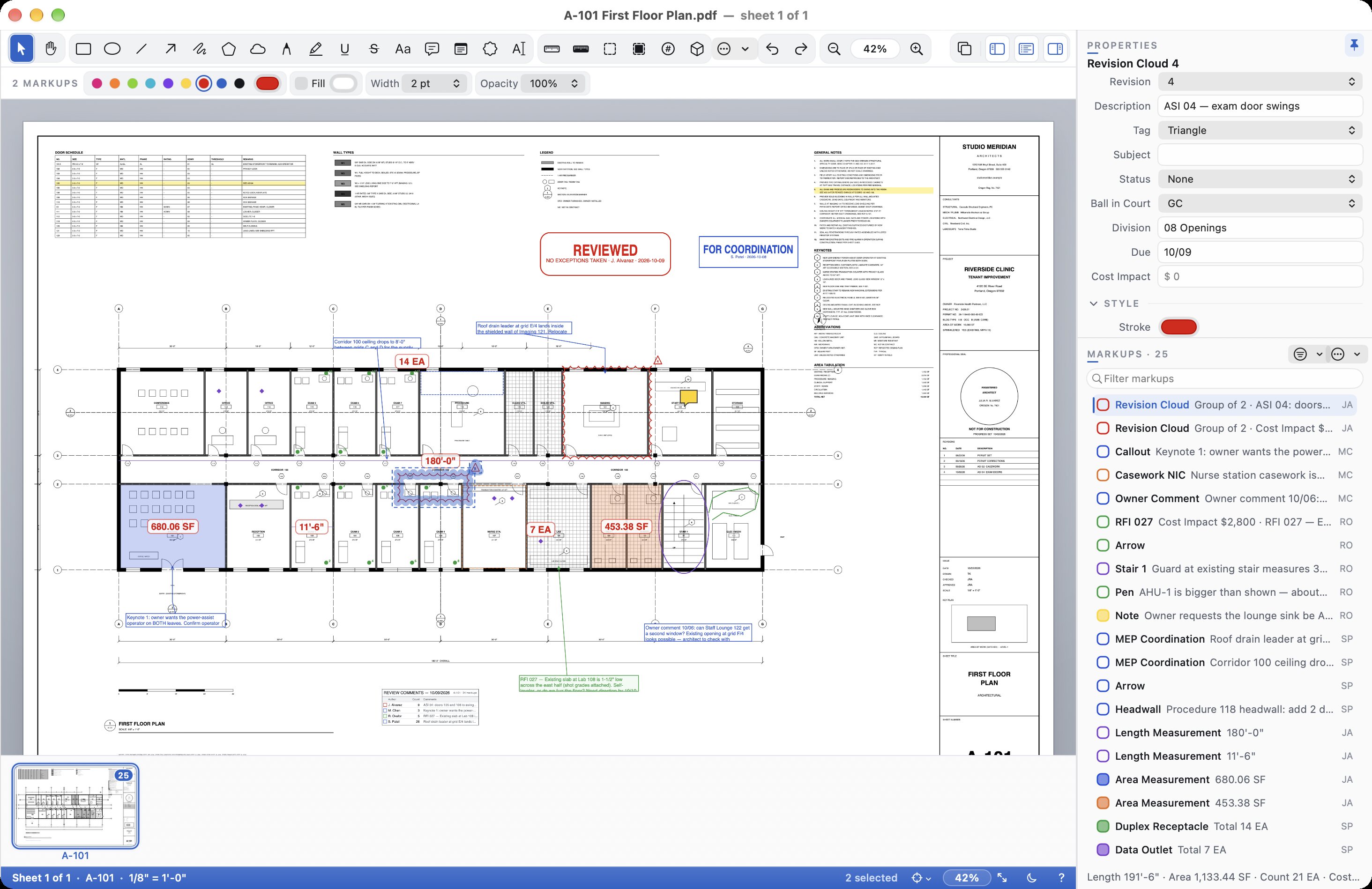
Cella on a Mac showing sheet A-101, a clinic floor plan covered in review markups: red revision clouds, blue callouts, area measurements of 680.06 SF and 453.38 SF, counts and stamps. The Properties panel shows the selected cloud's revision, status and custom columns, and the Markups List lists 25 markups.
$149 onceNo subscription. Updates included.
14-day free trialNo sign-up, no card.
Mac, Windows, LinuxThe same app everywhere.
Your files stay yoursNo account, no cloud.

Review, measure and price drawing sets

Redlines that look the part

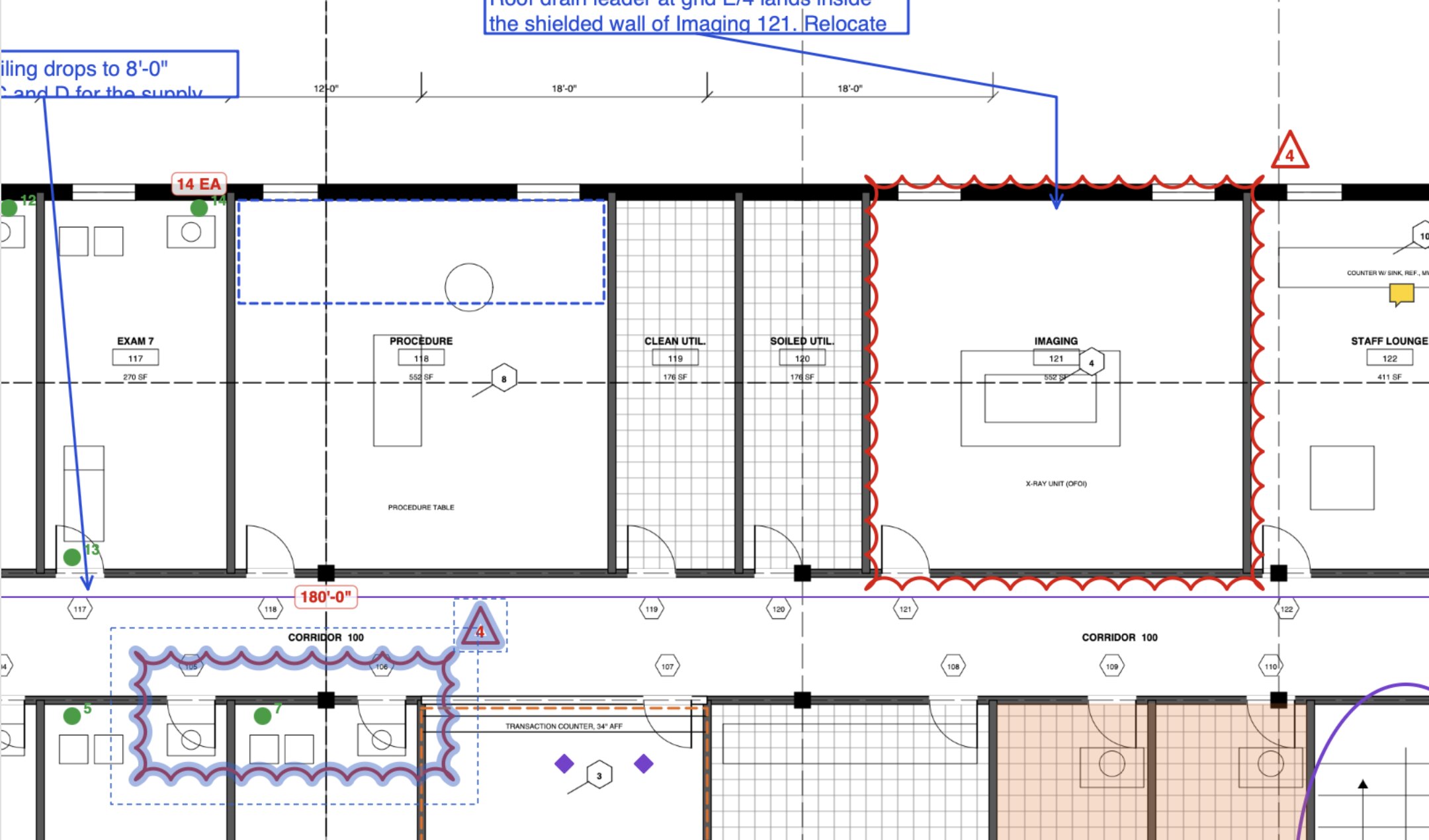
Clouds, callouts, text, arrows, stamps and highlights, plus numbered revision clouds and a revision schedule. Reply to markups and track their status.

A clinic floor plan in Cella at 133%: a red revision cloud around the Imaging room with a revision triangle, blue callouts, a selected cloud in the corridor, a 180'-0" length and a 14 EA count.
Clouds, callouts and revision tags on a floor plan

Measure to scale

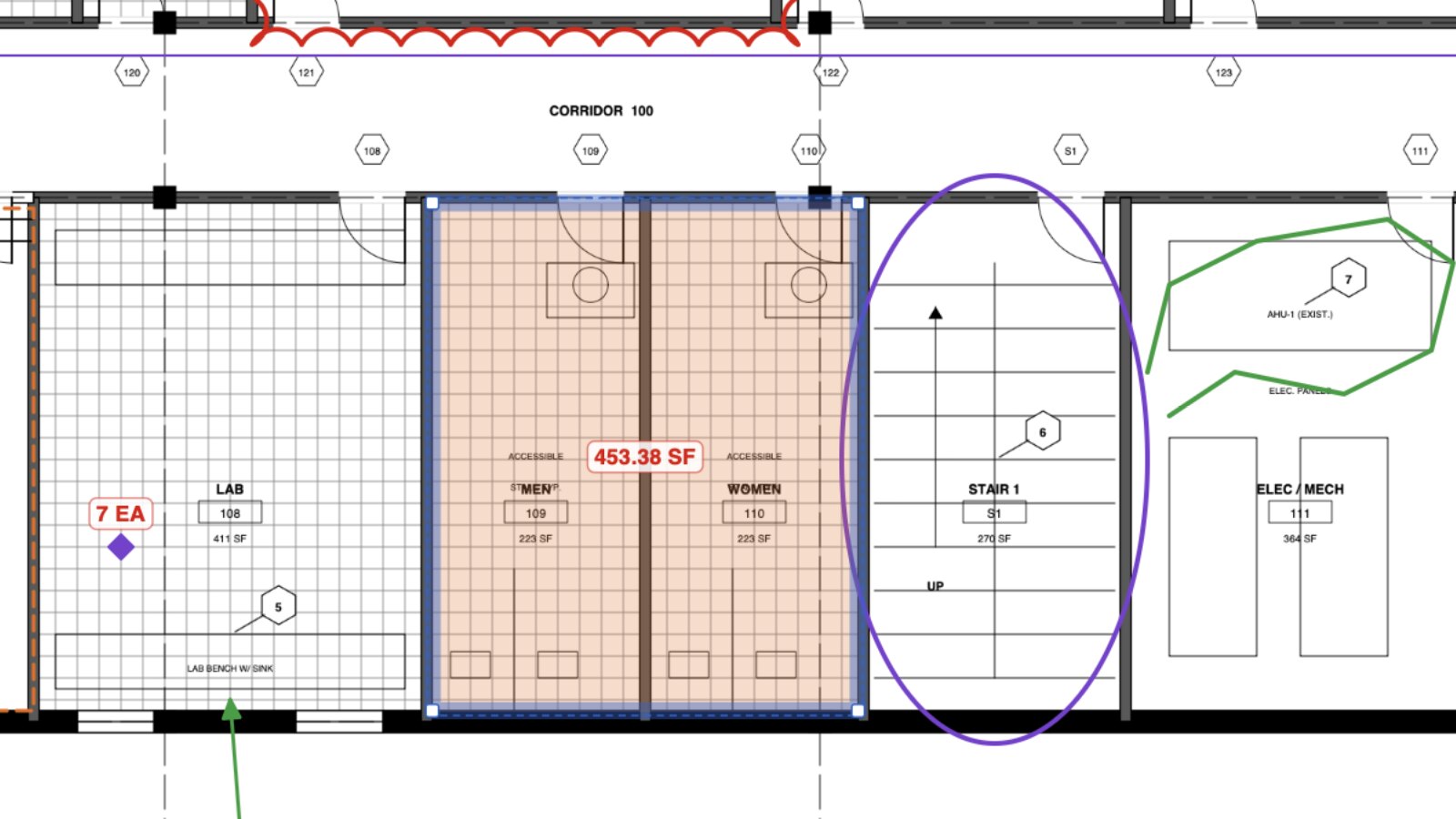
Calibrate once, then measure lengths, areas, perimeters, angles and counts. Click inside a room and Cella measures its area for you.

A selected area measurement of 453.38 SF covering two restrooms on a clinic floor plan in Cella, with a count of 7 EA in the lab and the stair outlined in purple.
Areas and counts measured to scale

Quantity takeoff with automatic totals

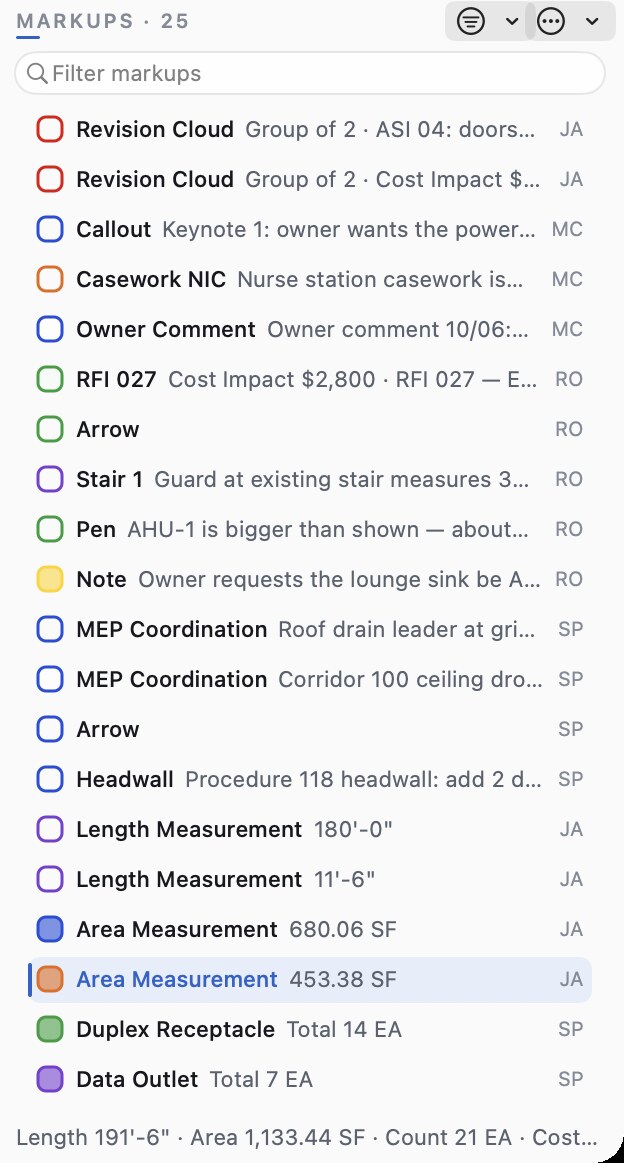
Every measurement lands in the Markups List, grouped by type with subtotals. Add your unit costs and export to Excel or CSV.

Cella's Markups List with 25 markups, including area measurements of 680.06 SF and 453.38 SF, counts of 14 EA and 7 EA, and the totals line: Length 191'-6", Area 1,133.44 SF, Count 21 EA.
Every measurement, totalled

Works with Bluebeam

Open PDFs marked up in Bluebeam Revu with markups and custom columns intact. Import your Revu tool sets. Markups you make in Cella show up exactly right in Revu and Acrobat.

Bluebeam and Revu are trademarks of Bluebeam, Inc. Acrobat is a trademark of Adobe. Cella isn't affiliated with or endorsed by either.

More tools, built in

Everything is included in the one price.

Compare revisions

Cloud every change between two issues.

Whole drawing sets

Open a folder as one set and search every sheet.

Visual Search

Find and count every instance of a symbol.

OCR for scans

Make scanned sheets searchable.

Split View

Two sheets side by side, in sync.

Edit Text

Fix a wrong label right in the drawing.

Digital signatures

Sign and certify PDFs with your certificate.

Redaction

Remove sensitive content for good.

PDF forms

Fill RFIs, transmittals and checklists.

Page tools

Split, combine, crop, resize and stamp sheets.

Exports

Excel, CSV, DXF and PDF/A.

Office standards

Share tool sets and lock your firm's styles.

One price. No subscription.

Cella
$149
one time
  • For Mac, Windows or Linux
  • Every 1.x update included
  • Every feature, nothing held back
  • 14-day free trial first, no sign-up
Download

Try it free

  1. Download Cella and open it.
  2. Use every feature free for 14 days.

Buy in the app

  1. In Cella, choose Buy Cella… and check out. Your license key arrives by email.
  2. Choose Enter License Key… and paste it.

Download Cella

Try every feature free for 14 days. No sign-up.

Mac

Download for Mac 20.6 MB

Requirements

macOS 12 Monterey or later, Apple silicon or Intel.

Install

Open the .dmg and drag Cella into Applications.

Windows

Download for Windows 85.1 MB Or the .zip, no installer (84.1 MB)

Requirements

Windows 10 or 11, 64-bit.

Install

Open Cella-1.0-Setup.msi. Cella is added to the Start menu.

Linux

Ubuntu .deb (x86_64) 41.3 MB Ubuntu .deb (arm64) 39.8 MB Arch package (x86_64) 41.7 MB

Requirements

Ubuntu 24.04 or later, or Arch Linux (including Omarchy).

Install

sudo apt install ./cella_1.0.0-1_amd64.deb
sudo pacman -U cella-bin-1.0.0-1-x86_64.pkg.tar.zst

Ready to buy? Choose Buy Cella… in the app, or Enter License Key… if you have one. · User Guide

Built for architects and builders

Architects

Redline progress sets, cloud revisions and issue clean PDFs.

Construction administration

Track RFIs and submittal comments with status and replies.

Estimators

Measure, count and price takeoffs, then export to Excel.

The whole project team

Consultants and clients can view every markup free.

Work together in real time

With Atrium, Cella's sync server, everyone's markups reach the whole project team as they're made. Work offline and changes sync when you're back.

Run it yourself

Free

One Docker container on your own server, with everything it needs included.

Hosted by Sorted Solution

We run and look after it for your firm. Ask about hosting →

What's new in Cella 1.0

Cella 1.0

  • Markup and measurement. Clouds, callouts, stamps, and calibrated lengths, areas and counts.
  • Quantity takeoff. Automatic totals, unit costs and Excel export.
  • Compare revisions. Cloud every change between two issues, or a whole set.
  • Scans and signatures. OCR, Edit Text, Visual Search and digital signatures.
  • Real-time collaboration. Share markups live with Atrium.

FAQ

How much does Cella cost?
$149, once. No subscription, and every 1.x update is included. See pricing.
How does the free trial work?
The 14-day trial starts the first time you open Cella. Everything works. No sign-up, no card.
What happens when the trial ends?
Cella becomes a free viewer: open, search and print drawings and read every markup. Marking up and measuring need a license key.
Who needs a license?
Anyone who marks up or measures. Everyone else on the project can open, search and print drawings and read every markup free.
Does Cella run on Windows and Linux?
Yes. Cella runs on Mac, Windows and Linux. Download it.
How do I move my license to a new computer?
On the old computer, open Cella License… and choose Deactivate This Device…. Then enter your key on the new one.
Does it need an internet connection?
Only to activate your key and re-check it now and then. Cella keeps working offline for up to 30 days.
Are my drawings uploaded anywhere?
No. There's no account and no cloud. Your drawings stay on your computer and your network. See our Privacy policy.
Do I need Atrium?
No. Atrium is optional, for teams who want markups shared live. More about Atrium.
What are the system requirements?
Mac: macOS 12 Monterey or later, Apple silicon or Intel. Windows: Windows 10 or 11, 64-bit. Linux: Ubuntu 24.04 or later, or Arch Linux (including Omarchy).
Where is the user guide?
In the app under Help, and online: Cella User Guide.

Try Cella free for 14 days

No sign-up, no card. $149 once when you're ready.